API Overview
Welcome to the Moss API!
API Introduction
Our REST API enables you to connect Moss with your systems, and automate finance workflows. It has predictable resource-oriented URLs, accepts JSON-encoded request bodies, returns JSON-encoded responses, and uses standard HTTP response codes, authentication, and verbs.
With this API, you can:
- Access expenses, including card transactions, invoices, and reimbursements, along with accounting attributes and dimensions
- Retrieve user and supplier information
- Retrieve accounting attributes and dimensions
Base URLs
All API endpoints are prefixed with /v1, for example:
https://public-api.getmoss.com/v1/expenses
API Version
The current API version is v1. The version is included in the URL path to ensure backward compatibility as the API evolves.
HTTP Methods
The API uses standard HTTP methods:
GET- Retrieve resourcesPOST- Create new resourcesPATCH- Partially update resources
Getting Started
- Create API Keys: Only admins can create API keys.
- Obtain Access Token: Use your Key ID and Secret Key to request a Bearer token
- Use Access Token: Include the token in API requests via Authorization header
Create API Keys
- Log in to your Moss account as an admin
- Navigate to Settings → Company Settings → API Keys
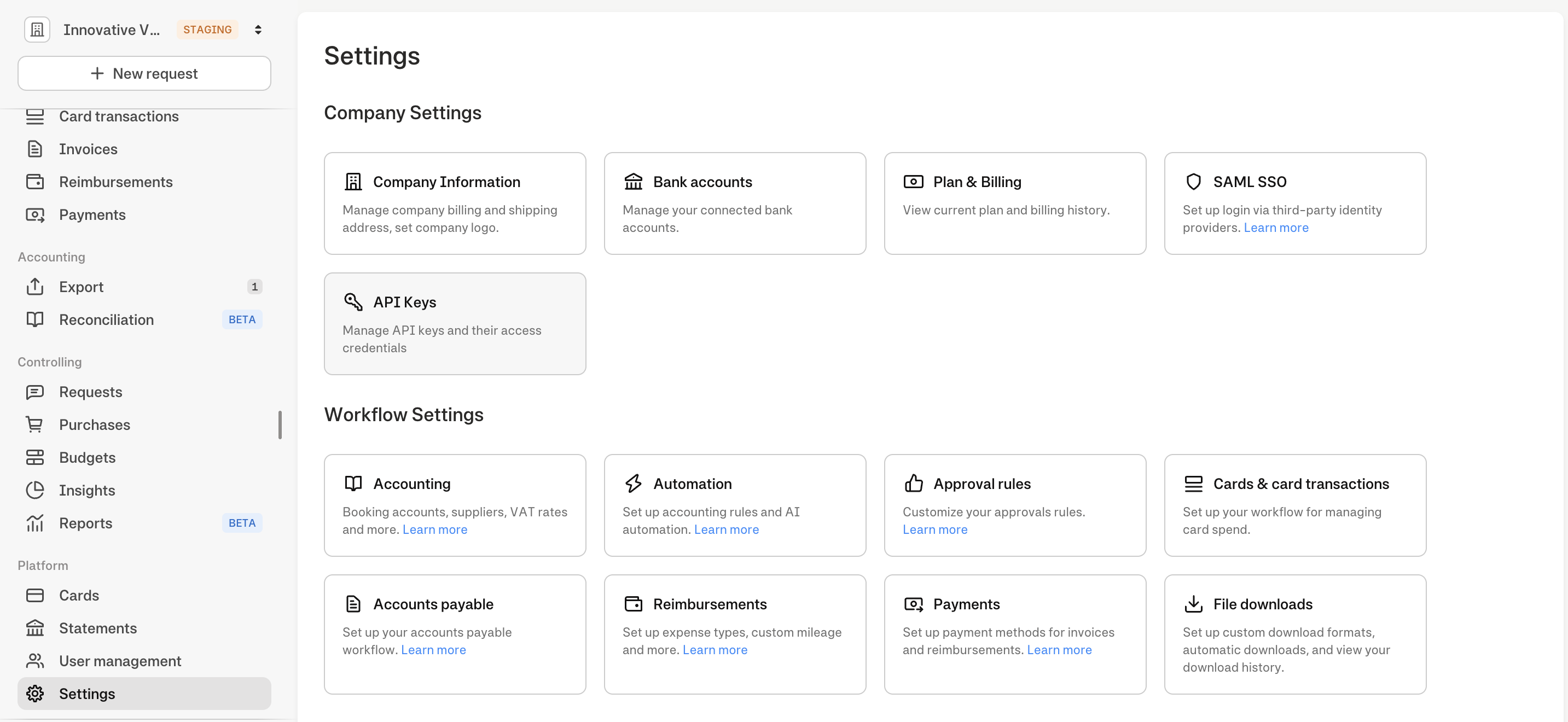
- Click "Generate API Key"
- Confirm the operation with Moss mobile app
- Save both the Key ID (kid_) and Secret Key (sk_) securely
Important: Store credentials securely and never expose them in client-side code
Authentication
Our API uses OAuth 2.0 client credentials flow to obtain Bearer tokens for authentication.
Obtain Access Token
Endpoint: POST {server_url}/oauth2/token
Request Parameters:
grant_type: Must beclient_credentialsclient_id: Your Key ID (starts withkid_)client_secret: Your Secret Key (starts withsk_)scope: Access level -readorwrite. Optional parameter, defaults toread
Example Request:
curl -X POST "https://public-api.getmoss.com/oauth2/token" \
     -H "content-type: application/x-www-form-urlencoded" \
     -d 'grant_type=client_credentials&client_id=kid_FaYnufhSMSP1qaXy&client_secret=sk_rKvWDzU6h46hiy3tluqskkrX6pepQTXI'
Response Example:
{
  "access_token": "eyJhbGciOiJFUzI1NiJ9...",
  "token_type": "Bearer",
  "expires_in": 3600,
  "scope": "read"
}
Use Access Token
Include the access_token value in the Authorization header of your API requests:
curl -H "Authorization: Bearer eyJhbGciOiJFUzI1NiJ9..." \
     https://public-api.getmoss.com/v1/expenses
Token Management
- Token Lifetime: Access tokens expire after 1 hour (3600 seconds)
- Token Refresh: Since this is client credentials flow, request a new token when the current one expires
- Token Format: JWT (JSON Web Token) with embedded user and scope information
Scopes and Permissions
- read: Grants access to GET endpoints for retrieving data
- write: Grants access to all endpoints including POST, PATCH operations
- Scope Hierarchy: write scope includes read permissions
Security Best Practices
- Rotate API keys regularly
- Use environment variables to store credentials
- Never commit API keys to version control
- Never expose credentials in client-side code
- Monitor API key usage for suspicious activity
Rate Limiting
API requests are rate limited to ensure service reliability and fair usage across all clients. Limits are applied per organisation and per scope:
| Scope | Limit |
|---|---|
Read (GET requests) | 180 requests per minute |
Write (POST, PATCH requests) | 20 requests per minute |
Every API response includes the following rate limiting headers:
| Header | Description |
|---|---|
X-RateLimit-Limit | Maximum requests allowed in the current rate limit window |
X-RateLimit-Remaining | Requests remaining in the current window |
X-RateLimit-Reset | Unix timestamp (UTC seconds) when the window resets |
X-RateLimit-Scope | Scope bucket for this limit: read or write |
When the rate limit is exceeded the API returns HTTP 429 Too Many Requests with:
- All four
X-RateLimit-*headers (X-RateLimit-Remainingwill be0) Retry-Afterheader with the number of seconds to wait before retrying- A JSON error body with
type: ERR_RATE_LIMIT_EXCEEDED
Rate Limiting Best Practices
- Monitor
X-RateLimit-Remainingto avoid hitting the limit - Implement exponential backoff when receiving 429 responses
- Respect the
Retry-Afterheader value when retrying
Pagination
List endpoints support pagination to manage large datasets efficiently. Currently, the API supports offset-based pagination.
Offset-Based Pagination
Some endpoints support traditional offset-based pagination.
Request Parameters:
page(optional): Page number (1-based, default: 1)page_size(optional): Number of items per page
Example Request:
GET /v1/expenses?page=2&page_size=50
Response Format:
{
  "data": [...],
  "meta": {
    "apiVersion": "1.11.0",
    "tracingId": "026cb8891f2f1bc257f6876ce4878a3f",
    "pagination": {
      "type": "offset",
      "page": 2,
      "pageSize": 50,
      "hasMore": true,
      "totalPages": 16,
      "totalItems": 789
    }
  }
}
Pagination Fields:
type: Always"offset"for offset-based paginationpage: Current page number (1-based)pageSize: Number of items per pagehasMore: Whether there are more pages availabletotalPages: Total number of pages (optional)totalItems: Total number of items across all pages (optional)
Errors
The API uses standard HTTP status codes and returns detailed error information based on RFC 9457 Problem Details format.
Response Structure
All responses follow a consistent structure with data, meta, and errors fields:
Success Response:
{
  "data": { ... },
  "meta": { ... }
}
Error Response:
{
  "data": null,
  "meta": {},
  "errors": [
    {
      "type": "ERR_VALIDATION_FAILED",
      "title": "Validation failed for property 'currency'",
      "detail": "Validation failed for property 'currency': should be one of EUR, USD, GBP, CHF, PLN, SEK. Provided: CZK",
      "pointer": "#/currency",
      "status": 400,
      "instance": "/v1/expenses"
    }
  ]
}
Error Fields
type: Error type identifier (e.g.,ERR_VALIDATION_FAILED)title: Short, human-readable summary of the errordetail: Detailed explanation of the errorpointer: JSON pointer (RFC 6901) to the field that caused the error (optional)status: HTTP status code (optional)instance: URI reference for this specific error occurrence (optional)
HTTP Status Codes
The API uses the following HTTP status codes:
Success Codes:
200 OK- Request succeeded201 Created- Resource created successfully
Client Error Codes:
400 Bad Request- Invalid request parameters or body401 Unauthorized- Missing or invalid authentication token402 Payment Required- Required billing module is not activated for this organization (e.g., Multiple Dimensions)403 Forbidden- Authenticated but not authorized to access the resource404 Not Found- Resource not found409 Conflict- Resource already exists or cannot be modified (e.g. duplicate name, managed by an active accounting integration)422 Unprocessable Entity- A referenced entity does not exist or is not active (e.g., expense account, cost carrier, payment term, VAT rate, or team)429 Too Many Requests- Rate limit exceeded
Server Error Codes:
500 Internal Server Error- An error occurred on the server502 Bad Gateway- Upstream service returned an invalid response503 Service Unavailable- Service temporarily unavailable504 Gateway Timeout- Upstream service did not respond in time
Common Error Types
ERR_VALIDATION_FAILED- Request validation failedERR_UNAUTHORIZED- Authentication required or failedERR_FORBIDDEN- Insufficient permissionsERR_NOT_FOUND- Resource not foundERR_MODULE_NOT_ACTIVATED- Required billing module is not activatedERR_DIMENSION_NAME_ALREADY_EXISTS- Dimension with the same name already existsERR_DIMENSION_ITEM_VALUE_ALREADY_EXISTS- Dimension item with the same value already existsERR_DIMENSION_INACTIVE- Dimension is inactive or deletedERR_MANAGED_RESOURCE_IMMUTABLE- Resource is managed by an active accounting integration and cannot be modifiedERR_RATE_LIMIT_EXCEEDED- Too many requests